Friday, December 01, 2006

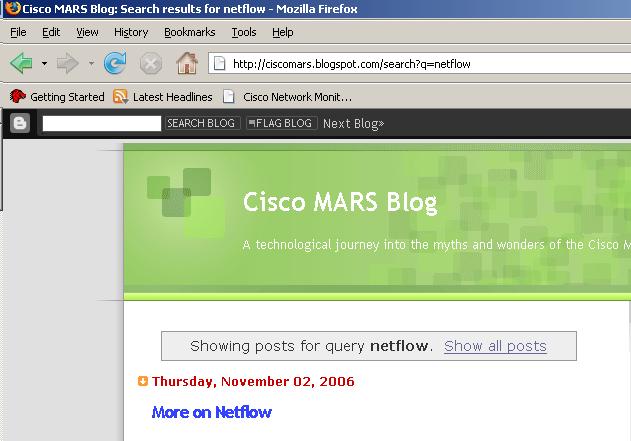
Search the Cisco MARS Blog

Sorry for no new posts this week, but i`ve been knocked out with the flu!

Its been a great month for the ciscomars blog, as i`ve had just short of 800 visitors in November, Thanks!

What has occurred to me, that many people may have not read some of the older posts, and i`ve have nearly 30 now.

Hence, the Blogger SEARCH


Works fantastic, as an example type: Netflow, and you receive a list of all my posts related to just that.

To also let you know whats coming on the Cisco MARS blog....

I have arranged some great "guest" articles from other people in the Security Industry, who know MARS inside out, watch out for these.

Also i have some articles coming on the Custom Parser functionality of MARS.

Thursday, November 23, 2006

CS-MARS Cisco Website Demo

There is a new CS-MARS Demo on the Cisco Website, over 5 mins long.

See how Cisco Security MARS enables a security operator to quickly monitor, identify, and mitigate a network threat to improve uptime and increase productivity.

For those people still wondering what MARS is, or considering buying an appliance, i`d suggest you have a look.

Monday, November 20, 2006

CS-MARS Book Review

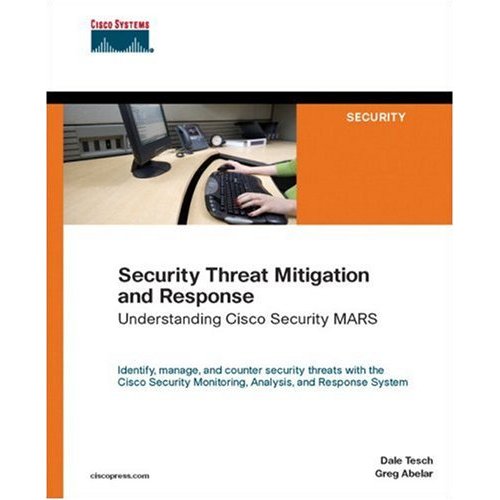
I`ve received a review of the Cisco Press Book - "Security Threat Mitigation and Response: Understanding Cisco Security Mars"

"From a total beginner in Security Event Management, i`d like a say what a great book this is. From the beginning, the reviews of SIM and STMs were very informative, the configuration of devices, and reporting have helped me a great deal to get the most out of my MARS box".. by John in Canada.

Thanks John, i`d second that, I have now finished the book cover to cover, and there are some great bits of info in the book, that you just dont get in the manual.

Thursday, November 16, 2006

CS-MARS using SNORT Sensors


Using open source SNORT with Cisco MARS


I`m sure everyone has heard of the free open source IDS/IPS product Snort. You may even have it running somewhere on your network. Well the great news is that CS-MARS supports Snort right out of the box.

I`m not going to go into much detail on how to configure Snort, but there is plenty of documentation on the Snort.org website. See www.snort.org/docs/

Snort Setup

In brief, we need Snort`s output to go to syslog with the log facility local4. Configure this in snort.conf (usually in /etc/snort)

output alert_syslog: LOG_LOCAL4 LOG_ALERT

And add a redirector in the syslog.conf file to send the syslog to the MARS appliance.

local4.alert @x.x.x.x (where x.x.x.x is the IP of the MARS appliance)

Restart the box, or just the Snort daemon and syslogd daemons, and we are ready to add your Snort sensor to MARS.

CS-MARS Setup

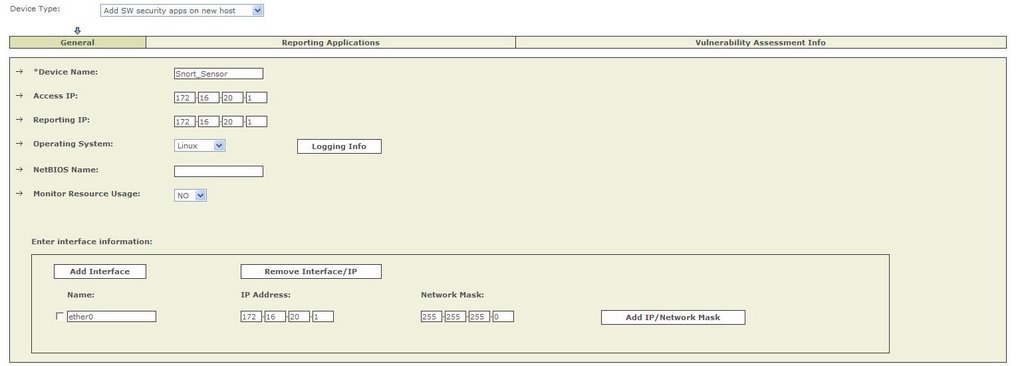
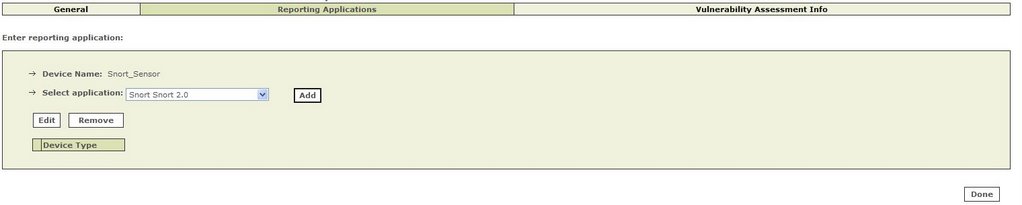
We set up the Snort sensor, as a SW Security apps on a new host.


And define Snort as a reporting application.


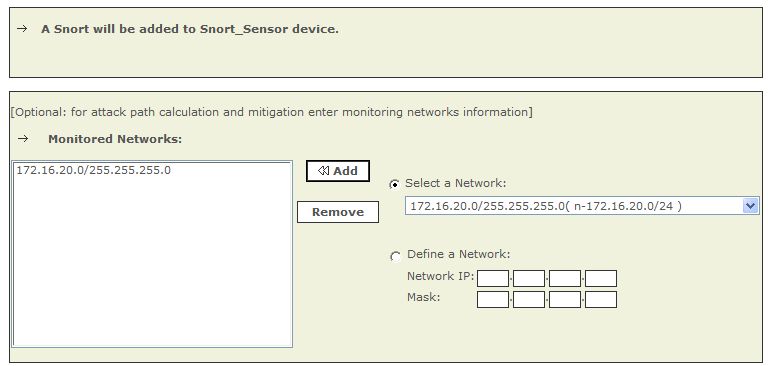
And specify the networks we are going to monitor.

And thats all that needs to be done! Submit and Activate and we are ready for MARS to start processing Snort events.

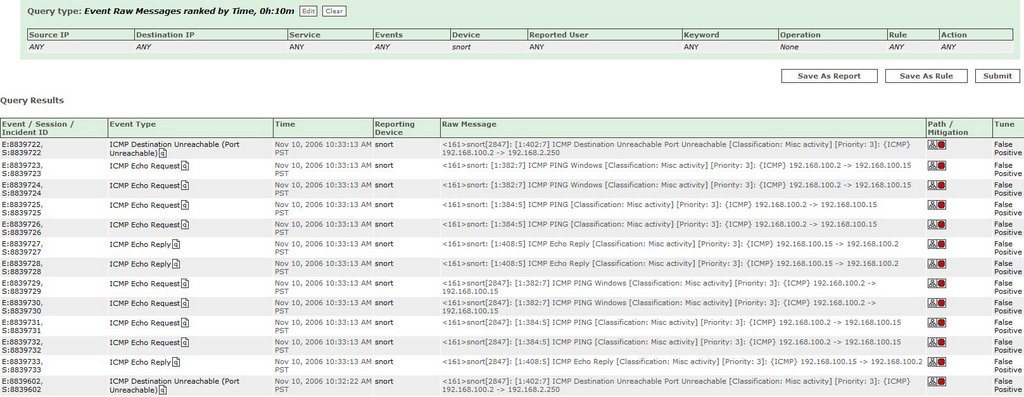
How can we check we are receiving events from our Snort sensor?

We can simply run a RAW Event Messages query, with just our Snort devices selected, over time or in real time, and see the events flowing in.


Snort Events

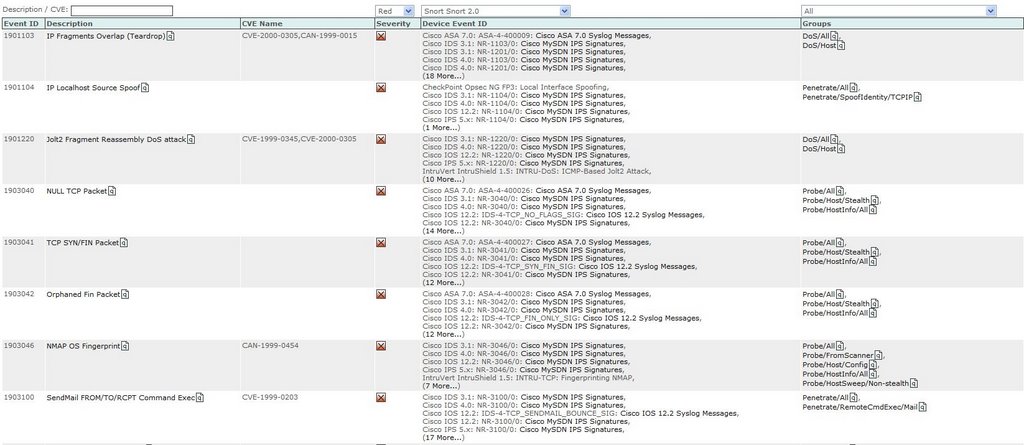
MARS knows about a whole range of Snort Events, a sample is shown below, which MARS will use to fire Incidents.


Incident Example 1 - MARS correlates the data from Snort and also a FW, to generate and fire an Incident for further Investigation.

An Incident was Fired by CS-MARS

The Rule that was Matched, to Generate the Incident (note the Reporting Device)


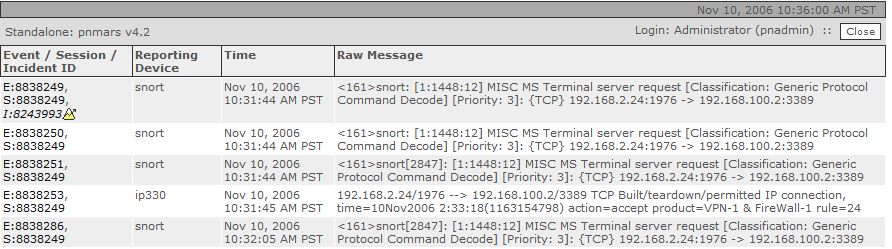
The Snort Raw Event Message (note Correlation from another FW device)

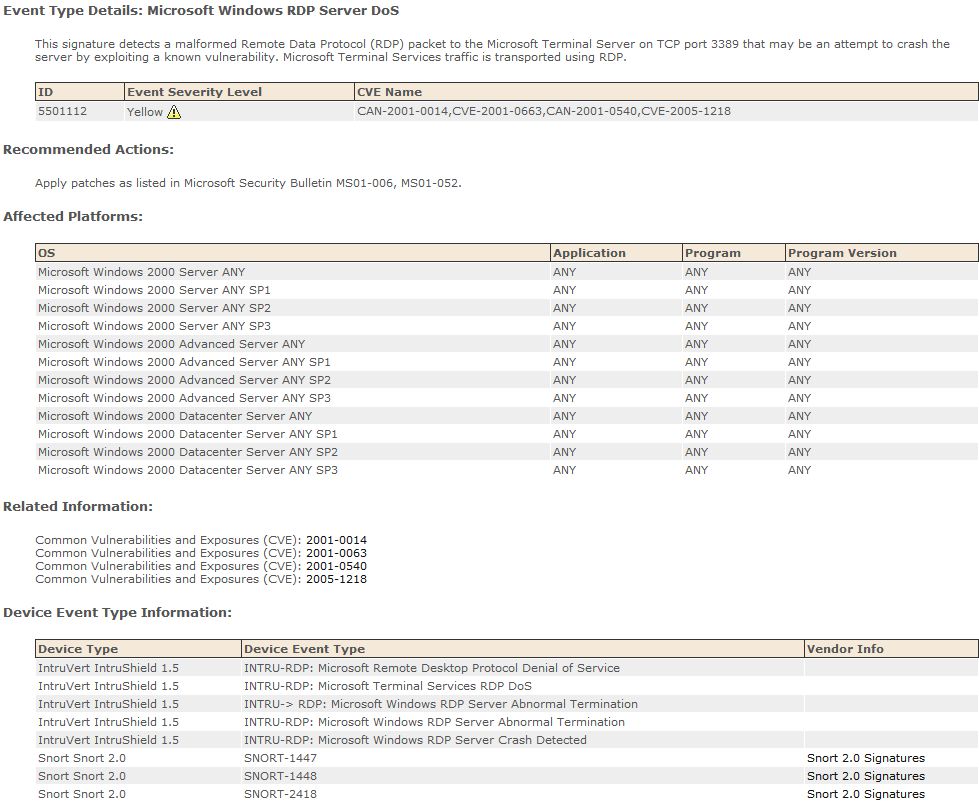
And Finally the Known MARS Event Info


Incident Example 2 - Web Server Attacks

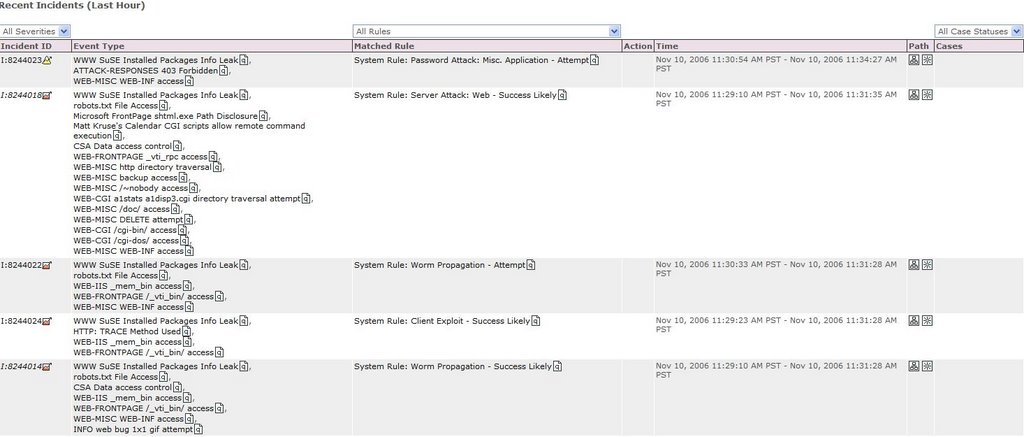
Incidents were fired by CS-MARS


The Rule that Generated the Incident


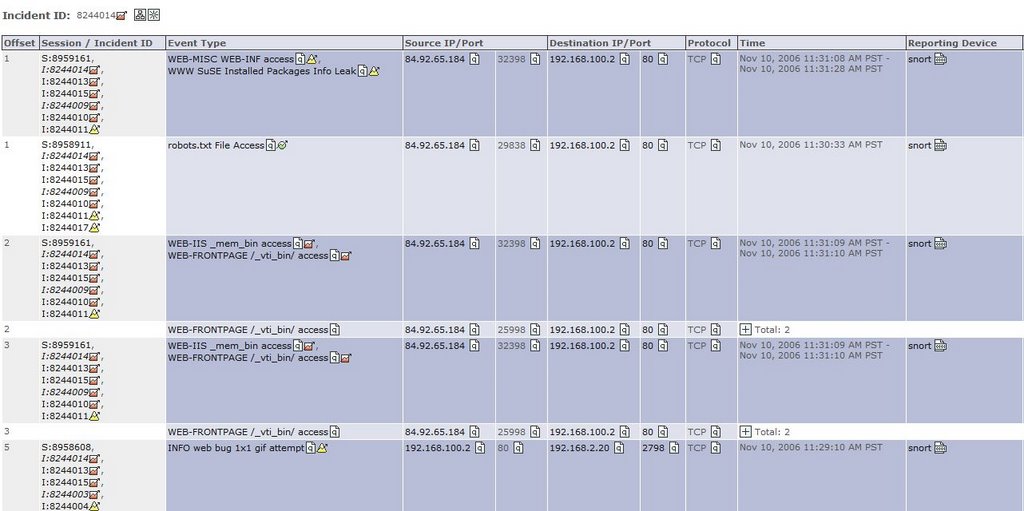
And the Correlated Sessions that relate to this Particular Incident


CS-MARS Reporting

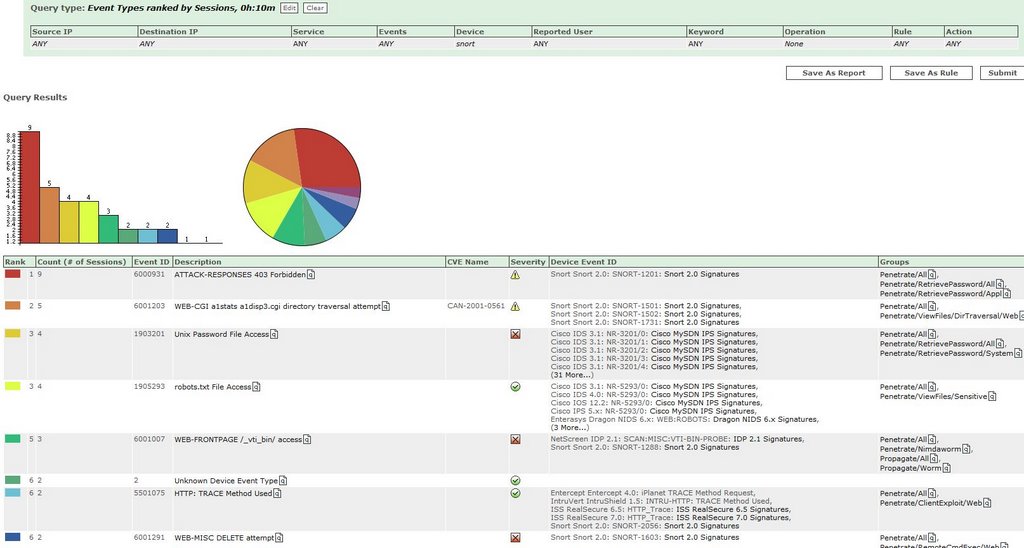
Like with any other reporting device in MARS, we can run queries and reports against the data we have collected.


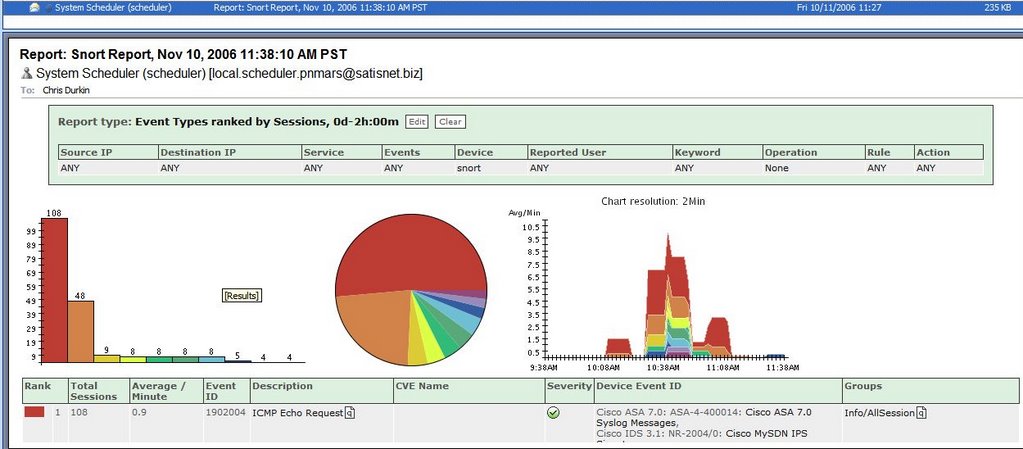
And have these reports emailed to certain individuals by the CS-MARS appliance.


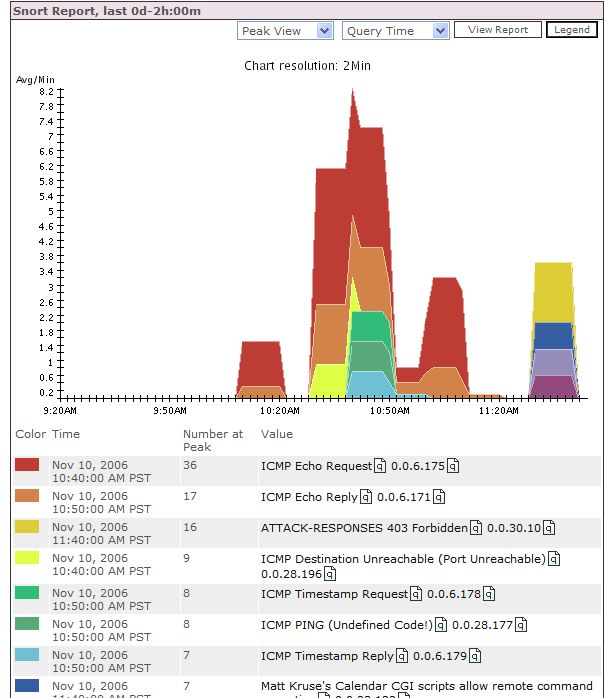
And finally use these reports on the CS-MARS dashboard.


What I haven`t shown here is the ability to create drop rules and tune your false positives generated by the Snort sensors, although this can be done on the Snort sensors themselves.

As hopefully shown, using CS-MARS is an ideal platform for reporting from your Snort sensors, and a great low-cost IDS/IPS solution to add to your network.


Monday, November 13, 2006

CS-MARS reporting with McAfee ePO

I had chance last week to test MARS with McAfee ePolicy Orchestrator. I only had time to play around with the Virus functionality, but i plan to test further with the Patch and Compliance pieces too.

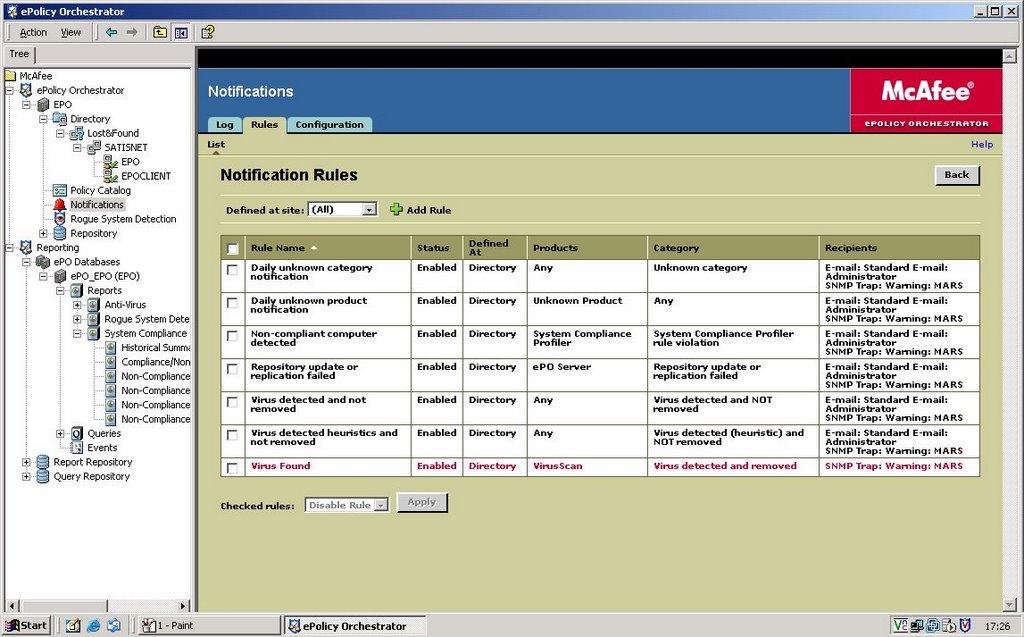
Basically McAfee ePO is set as a reporting device to MARS via SNMP alerts.


The Alerts are customisable via the McAfee Console.

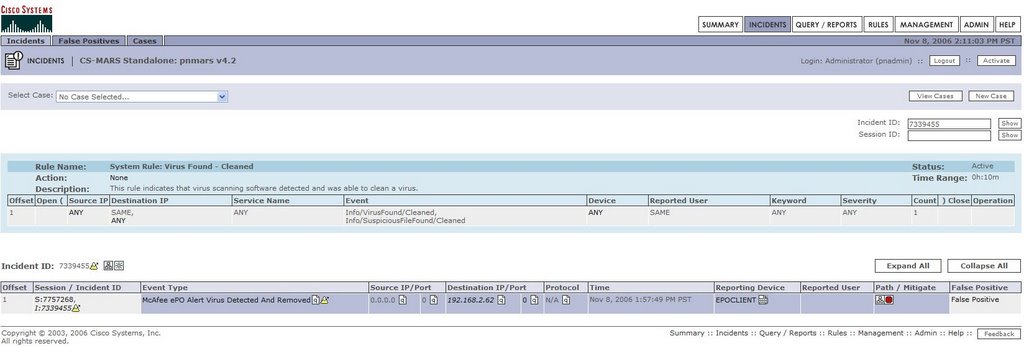
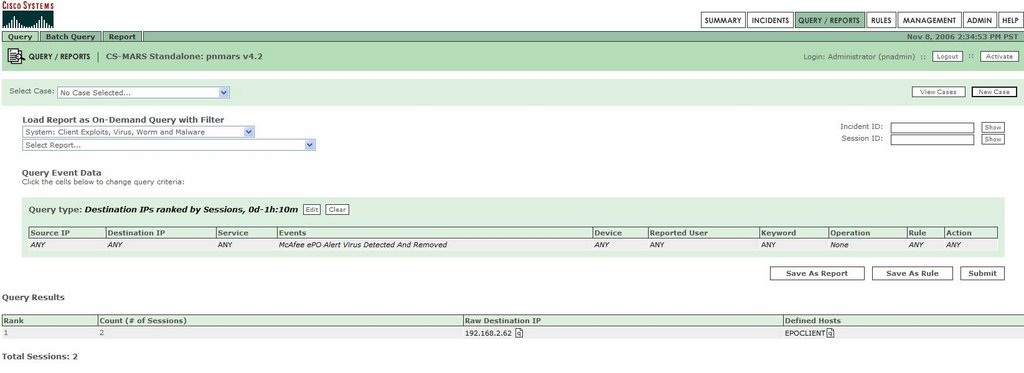
MARS takes these alerts to fire Incidents, which could be as simple as a Virus Found and Cleaned as below, or a Worm Traversing the network for multiple alerts.


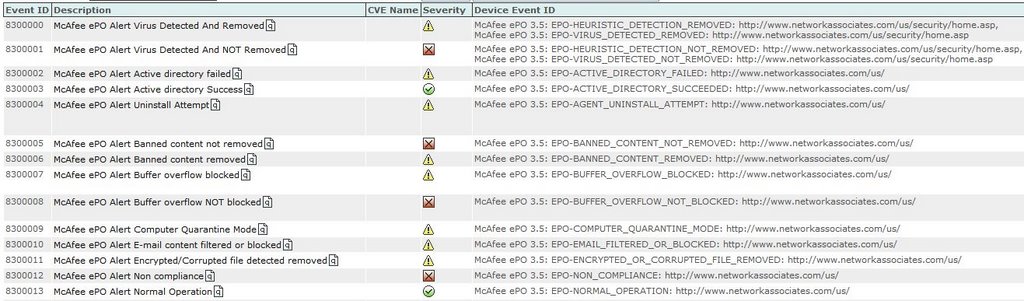
Now MARS can fire Incidents not just for Virus Events received from ePO. If you look at the shots below, ePO is far from just an AV product, and there are other McAfee products that can report into the ePO console.


and more..........


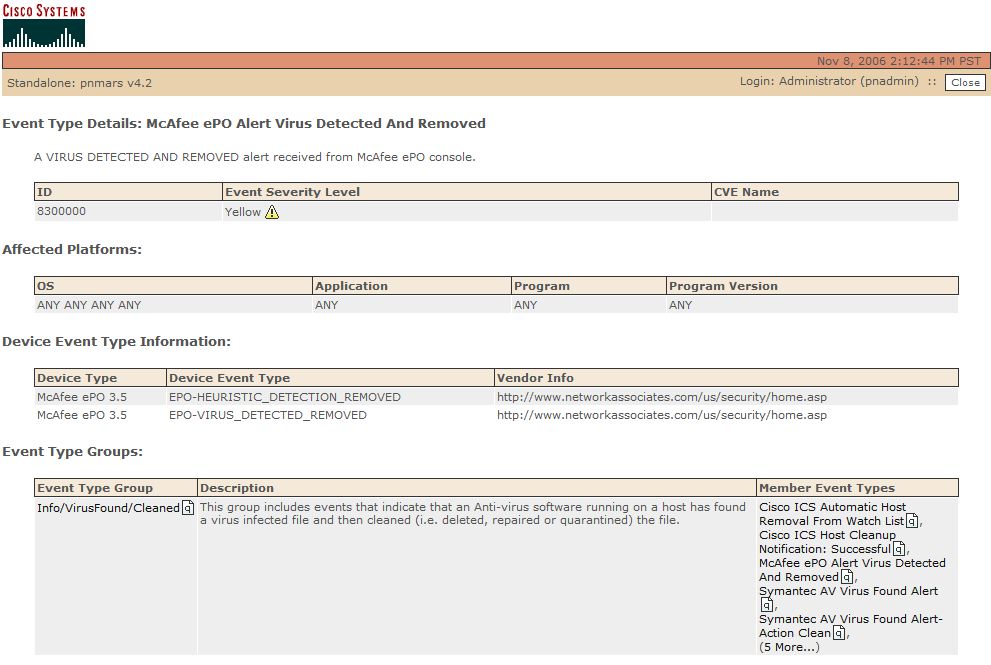
MARS holds event information for all these Alerts, as pictured below.

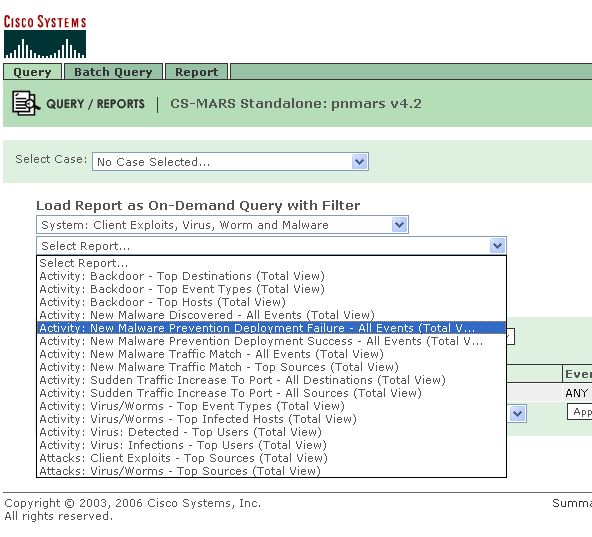
Now one of the biggest features of MARS is its reporting functionality. MARS has a list of predefined reports that can be run on the fly or scheduled, in this case under the heading of Client Exploits, Virus, Worm and Malware.

Or we can create our own queries.


In the Book "Security Threat Mitigation and Response", the Author states..

"Antivirus server logs and queries - CS-MARS can use this information to determine the host OS and patch levels. "

As i said earlier, i plan to investigate more with the McAfee solution, and more specifically testing Patch levels on hosts, and reporting this info into MARS.

Friday, November 10, 2006

Wednesday, November 08, 2006

Drop me a Line

I`ve been busy recently preparing lots of new articles for the MARS Blog.

PDF copies of all articles should be ready soon, along with Demos/Configurations of McAfee ePO, and Snort Sensors working with MARS.

But, i am open to ideas. So please drop me a line/leave comments below, and let me know who you are, and what you`d like to see!

Any recommendations for enhancements for MARS would be good, and i`ll see if i can get these across to Cisco Product Management.

Monday, November 06, 2006

Cisco MARS and PCI Compliance

The Payment Card Industry (PCI) Data Security Standard is applicable to all enterprise, SMB, and retail organizations that handle credit card transactions. Businesses of all sizes are responsible for complying with the PCI Data Security Standard.

Any company that stores, processes, or transmits credit card information is required to comply with PCI. The PCI standard was created by major credit card companies VISA and MasterCard. These companies have specific programs, such as VISA CISP and MasterCard SDP, which are based on the PCI standard. Other credit card companies have adopted the PCI Data Security Standard as well, such as American Express, Diners Club, and Discover.

How Can Cisco MARS help with complying with the PCI Data Security Standard?

MARS helps to meet some of the criteria needed. There are a couple of Requirements in the PCI Draft, namely Requirements 10 and 11, that MARS can provide a solution for.
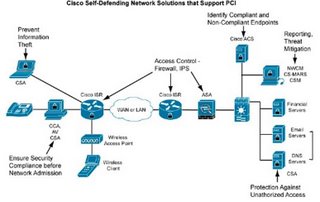
I have detailed the PCI Requirements below, and reproduced Cisco views of how it meets those requirements, (with some sections relating to MARS plus A.N.Other Cisco Product to meet the requirement)
Links to the Cisco Website, and some great Whitepapers are also provided below..


Regularly Monitor and Test Networks

PCI Requirement 10: Track and monitor all access to network resources and cardholder data.

Logging mechanisms and the ability to track user activities are critical. The presence of logs in all environments allows thorough tracking and analysis if something goes wrong. Determining the cause of a compromise is difficult without system activity logs.

Sub-requirements:

10.1 Establish a process for linking all access to system components (especially those done with administrative privileges such as root) to an individual user.

10.2 Implement automated audit trails to reconstruct the following events, for all system components:

10.2.1 All individual user accesses to cardholder data

10.2.2 All actions taken by any individual with root or administrative privileges

10.2.3 Access to all audit trails

10.2.4 Invalid logical access attempts

10.2 5 Use of identification and authentication mechanisms

10.2.6 Initialization of the audit logs

10.2.7 Creation and deletion of system-level objects

10.3 Record at least the following audit trail entries for each event, for all system components:

10.3.1 User identification

10.3.2 Type of event

10.3.3 Date and time

10.3.4 Success or failure indication

10.3.5 Origination of event

10.3.6 Identity or name of affected data, system component, or resource

10.4 Synchronize all critical system clocks and times.

10.5 Secure audit trails so they cannot be altered:

10.5.1 Limit viewing of audit trails to those with a job-related need.

10.5.2 Protect audit trail files from unauthorized modifications.

10.5.3 Promptly back up audit trail files to a centralized log server or media that is difficult to alter.

10.5.4 Copy logs for wireless networks onto a log server on the internal LAN.

10.5.5 Use file integrity monitoring and change detection software (such as Tripwire) on logs to ensure that existing log data cannot be changed without generating alerts (although new data being added should not cause an alert).

10.6 Review logs for all system components at least daily. Log reviews should include servers that perform security functions like IDS and authentication (AAA) servers (RADIUS, for example).

10.7 Retain your audit trail history for a period that is consistent with its effective use, as well as legal regulations. An audit history usually covers a period of at least one year, with a minimum of three months available online.

Cisco Recommendations to Requirement 10.

The PCI Data Security Standard (Requirement 10) states, “The presence of logs in all environments allows thorough tracking and analysis when something does go wrong. Determining the cause of a compromise is very difficult without a system activity log.”

The Cisco Secure ACS Server in conjunction with CS-MARS can provide extensive information on access to network resources and cardholder data. Cisco Secure ACS authenticates, authorizes, and provides accounting information on usage parameters.

Cisco Secure Monitoring Analysis and Response System is a logging tool that stores all logs from a multitude of different vendors. In addition, CS-MARS is particularly strong at incident response once a security event occurs. For instance, it can provide early warning indicators, attack visualization, and mitigation recommendations to control security attacks. CS-MARS is a next-generation tool that meets all of these requirements and morel. The ability to visualize an attack and suggest methods

to stop its spread are indicative of the correlative intelligence that CS-MARS brings to a multi-vendor environment. In addition, sub-requirement 10.5.5 for file integrity checking of log files can be addressed with Cisco Security Agent.


Regularly Monitor and Test Networks

PCI Requirement 11: Regularly test security systems and processes.

Vulnerabilities are continually being discovered by hackers and researchers, and introduced by new software. Systems, processes, and custom software should be tested frequently to ensure security is maintained over time and through changes.

Sub-requirements:

11.1 Test security controls, limitations, network connections, and restrictions routinely to make sure they can adequately identify or stop any unauthorized access attempts. Where wireless technology is deployed, use a wireless analyzer periodically to identify all wireless devices in use.

11.2 Run internal and external network vulnerability scans at least quarterly and after any significant change in the network (new system component installations, changes in network topology, firewall rule modifications, or product upgrades, for example).

Note: External vulnerability scans must be performed by a scan vendor qualified by the PCI.

11.3 Perform penetration testing on network infrastructure and applications at least once a year and after any significant infrastructure or application upgrade or modification (operating system upgrade, subnetwork added to environment, Web server added to environment, for example).

11.4 Use network IDSs, host-based IDSs and IPSs to monitor all network traffic and alert personnel to suspected compromises. Keep all intrusion detection and prevention engines up to date.

11.5 Deploy file integrity monitoring to alert personnel to unauthorized modification of critical system or content files, and perform critical file comparisons at least daily (or more frequently if the process can be automated). Critical files do not necessarily contain cardholder data. For file integrity monitoring purposes, critical files are usually those that do not regularly change, but the modification of which could indicate a system compromise or risk of compromise. File integrity monitoring products usually come preconfigured with critical files for the related operating system. Other critical files, such as those for custom applications, must be evaluated and defined by the merchant or service provider.

Cisco Recommendations to PCI Requirement 11

The Cisco Customer Advocacy team is comprised of dedicated industry professionals with extensive expertise in conducting unbiased security posture assessments, penetration testing, and vulnerability scanning. Cisco would be pleased to engage this team in this process.

The Cisco Customer Advocacy team would help address sub-requirements 11.1 through 11.3.

The Cisco secure router already includes intrusion prevention capabilities. Customers can deploy IDS or IPS signatures to the router without the need for an additional IDS or IPS appliance. This helps address sub-requirement 11.4. This pervasive IDS/IPS solution will

control attacks for both wired and wireless users. In collaboration with CS-MARS, identified threats can be quickly stopped network wide.

When CS-MARS recognizes an attack, it will automatically propagate or enable the appropriate attack signature in every Cisco secure router equipped with the integrated intrusion prevention capability, quickly isolating and preventing the spread of the attack.

For customers requiring more powerful IDS/IPS appliances, Cisco recommends the Cisco IPS 4200 Series of sensor appliances. The Cisco IPS 4200 Series greatly increases the scalability and throughput of the security solution. Cisco also provides intrusion detection and prevention modules for the Cisco Catalyst 6500 Series. This illustrates the ability of Cisco security solutions to integrate natively into the infrastructure. The advanced intrusion prevention capabilities supported by Cisco IPS 4200 Series dedicated IPS appliances are also integrated into the Cisco ASA family.

The host-based Cisco Security Agent IPS tool can mitigate the threat from worms and viruses and can assist with file integrity checking as defined in Section 11.5.


Managing Risk and Compliance with the Cisco Self-Defending Network

Managing Risk and Compliance with the Cisco Self-Defending Network - EMEA

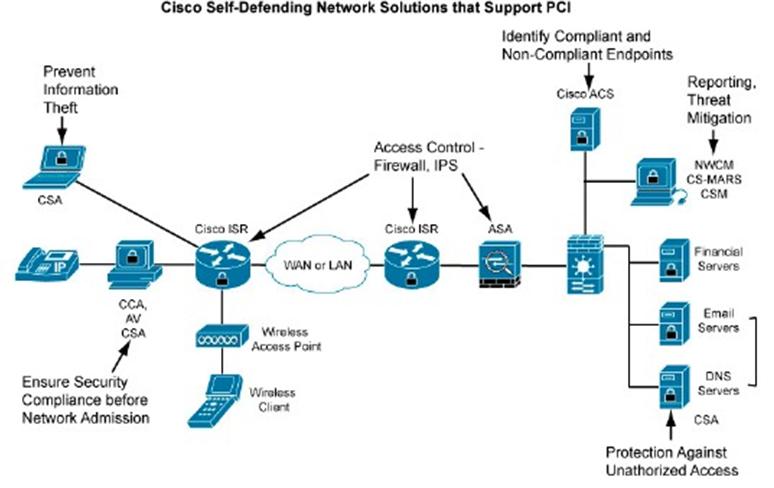
Cisco Self-Defending Network Support for PCI Data Security Standard

Addressing the PCI Data Security Standard


Thursday, November 02, 2006

More on Netflow

Some people have requested further info on what Netflow is.

On the Cisco webiste this link, provides an Introduction to Netflow Technologies.

Friday, October 27, 2006

How does MARS use NetFlow information?

Netflow is a Cisco technology, that supports monitoring network and is supported on all basic IOS images.

Netflow is an efficient method of monitoring high volumes of traffic compared to traditional SYSLOG and SNMP methods. To receive comparable syslog data from a firewall device, the syslog logging level on the firewall would need to be set to DEBUG.

CS-MARS uses NetFlow Version 5 or Version 7. Ideally Netflow should be collected from the Core and Distribution switches in your network.

Netflow data enables MARS to identify anomalies by profiling typical data flows across your network. This allows MARS to detect day-zero attacks, including worm outbreaks.

MARS uses NetFlow data and Firewall traffic logs to

1. Profile the network usage - Statistical profiling takes between four days and two weeks for a MARS appliance to complete.
2. Detect statistically significant anomalous behavior and traffic flows (from computed baseline) and creates incidents in response to them.
3. Correlate anomalous behavior to attacks and other events reported by Network IDS systems.

The NetFlow data and Firewall traffic logs are treated uniformly since they both represent traffic in an enterprise network.

After getting inserted into a network, MARS learns the network usage for a few days. Then it switches to a detection mode where it looks for statistically significant behavior, e.g. the current value exceeds the mean by 2 to 3 times the standard deviation.

CS-MARS profiles the network at a detailed level and keeps a profile of top combinations of flows learned and packets exchanged for every hour, every day of the week.

By default MARS does not store the NetFlow records in the database because of the high data volume, although MARS can be configured to do so.

Upon detecting an anomalous behavior, MARS starts to dynamically store the full NetFlow records for the anomalous (host, port) - thus the full context of a security incident, e.g. the infected source,destination etc. is easily available to the administrator.

CS-MARS can be configured to profile hosts that belong to a set of known valid networks. This reduces MARS memory usage.

Upon detecting an anomalous behavior, CS-MARS starts to dynamically store the full NetFlow records for the anomalous activity. This intelligent collection system provides all the information that a security analyst needs and does not overburden CPU and disk resources.

MARS provides built-in rules for automatically correlating anomalous behavior with attacks reported by Network IDS systems - such a rule can easily capture a successful attack since a compromised host is likely to exhibit anomalous Network DoS behavior of the form
• Sending too many e-mails containing a worm
• Sending excessive traffic on a particular port looking for additional systems to compromise

IE, say that CS-MARS learns that most connections to and from a server in your environment are made over ports 137, 138, and 139. Then suddenly that server makes multiple outbound port 25 connections through the default gateway. CS-MARS would trigger a "mass-mailing worm" incident to notify the operators of the change in behavior.

Even without a Network IDS system in place, a host compromised by an unknown attack is highly likely to exhibit anomalous behavior of the form described above and hence will be easily detected by the MARS Appliance.

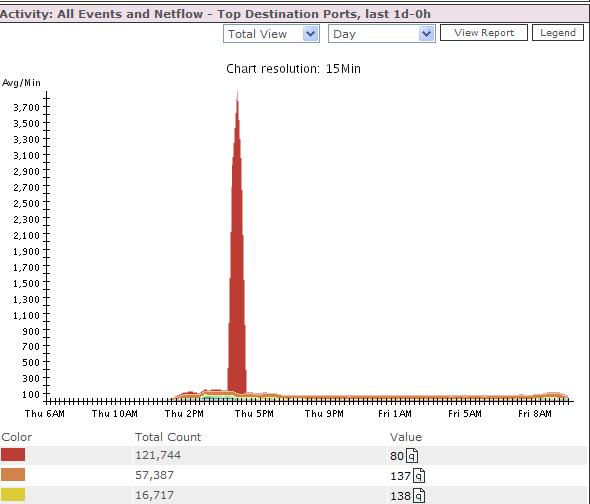
CS-MARS uses NetFlow and Firewall Log information to graphically depict port-level activity on your network using a graph that measures protocol connections over time.

CS-MARS Activity: All Events and NetFlow Chart

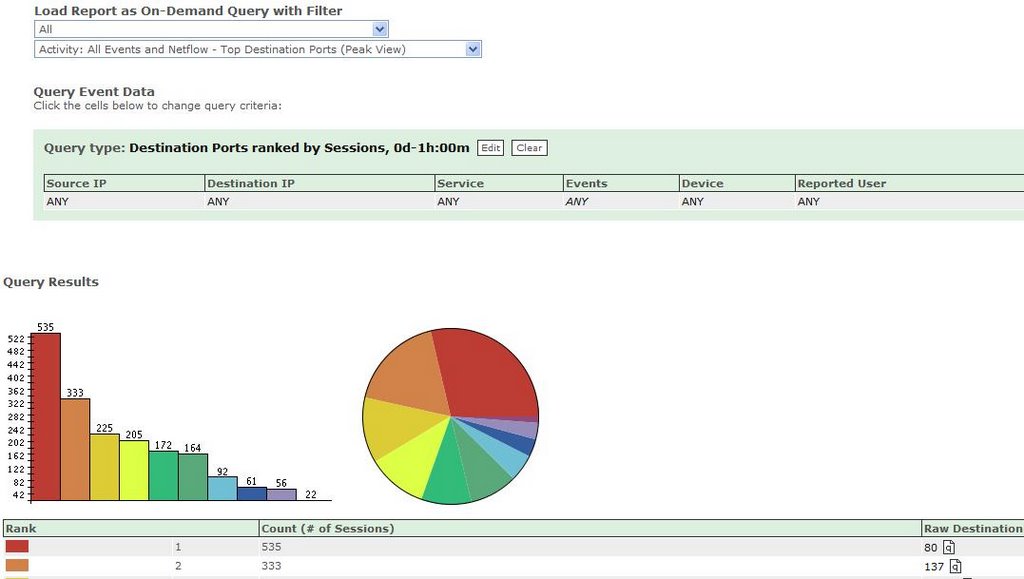
And you can run queries too.

As can be seen in the picture MARS has reported huge deviations from typical port 80 activity. This would obviously be more interesting with a day zero worm or virus , using a non statndard port, but this is an example of behaviorally profiling port activity.

Often when these malicious programs are released, they do not contain names or have detection signatures for them. Your organization's only defense against detecting and mitigating day-zero attacks at a network level is to use CS-MARS. Firewall data and NetFlow information give you this unique capability.

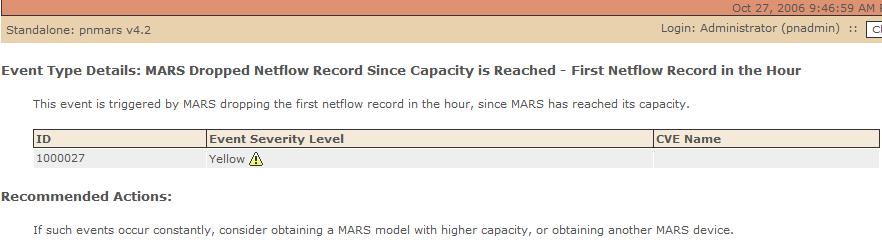
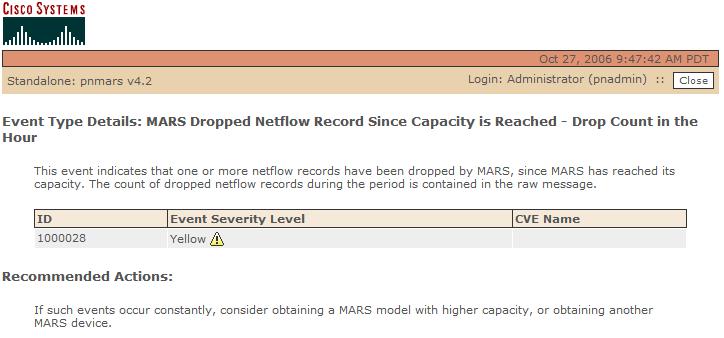
A word of warning though about Netflow. Too much will increase the CPU requirements of your MARS Appliance. MARS does though have a couple of warning alerts, can can give you an indication you have undersized the right appliance for your network. See below.