Thursday, February 21, 2008

Network World’s 20 Useful Sites for Cisco Networking Professionals

This morning I was honoured to find out, that i am featured in Network World`s 20 useful sites for Cisco networking professionals.


Quote "If you're studying for Cisco exams and just about to tear your hair out, don't fret, there are many others in the same position, and many of them are writing up their experiences in their blogs and passing along hints and tips. Even if you're a CCIE pro, there's always room for personal improvement and expansion. With that in mind we've scoured the Web to bring you our top 20 most useful Web resources for Cisco networking professionals. Of course, we don't want you to forget the resources and blogs of Cisco Subnet and our own bloggers, so we'll give a recap of our own Cisco resources and bloggers at the end of our top 20 list. Compiled by Jim Duffy and Linda Leung"


Let me say a big thank you to the folks at network world for mentioning the blog, and a big welcome to any new readers.

Monday, February 11, 2008

Upgrade Note

This is taken straight out of the release notes, and its definately something you should be aware of, at upgrade time.....

"The MARS Appliance performs a file system consistency check (fsck) on all disks when either of the following conditions is met:

•If the system has not been rebooted during the past 180 days.

•If the system has been rebooted 30 times.

The fsck operation takes a long time to complete, which can result in significant unplanned downtime when rebooting the system after meeting a condition above.

For example, a MARS 50 appliance can take up to 90 minutes to perform the operation.
"

Friday, February 08, 2008

4.3.3 and 5.3.3 Released

Cisco have released Cisco MARS 4.3.3 for Gen1 appliances, and 5.3.3 code for Gen2 appliances.

The release notes can be found here - 4.3.3 and 5.3.3

I`m not sure why theres such a difference in the file sizes, seeing as the only difference is updated Wireless LAN Controller support in the 5.3.3 code.

For both releases, enhanced device support is as follows...

Enhanced Cisco Device Support:

–FWSM 3.1.7 (as 3.1)

Enhanced 3rd-Party Device Support:

–Oracle 11g (as Oracle Database Server Generic)

–Snort 2.7 and 2.8 (as 2.0)

–QualysGuard 5.1 (as QualysGuard ANY)

The new updated Vendor Signatures are shown below, i have pictured both releases for reference, but they seem to be the same.

Release 4.3.3

Release 5.3.3

I have successfully updated a Gen2 model this morning...

############################################# 100.0%
Upgrading ... - Stopping CS-MARS applications : #
- Updating database schema : #
- Updating MARS applications : #
- Importing data : #
- Signature upgrade ...
- Signature upgrade success
- Rebooting ...
1
1
succeed!

And a handy tip is after an upgrade is to run a pnupgrade log, to check that you have the "Upgrade from 5.3.2 2765 to 5.3.3 2774 finished." statement at the end.

[pnadmin]$ pnupgrade log
--------------------------------------
5.3.2 2765 --> 5.3.3 2774
--------------------------------------
1 Preparing upgrade start
1.1 Load the step table start
1.1 Load the step table end
1.2 Stop pnmonitor start
1.2 Stop pnmonitor end
1.3 Stop jboss start
1.3 Stop jboss end
1.4 Stop other applications start
1.4 Stop other applications end
1 Preparing upgrade end
2 Upgrade OS start
2.1 Patch OS start
2.1 Patch OS end
2 Upgrade OS end
3 Upgrade schema start
3.1 Run upgrade schema script start
3.1 Run upgrade schema script end
3.2 Backup schema script start
3.2 Backup schema script end
3 Upgrade schema end
4 Upgrade MARS applications start
4.1 Untar MARS executable binary start
4.2 Untar MARS executable binary end
4.3 Modify janus.conf start
4.3 Modify janus.conf end
4.4 Swap MARS executable binary start
4.4 Swap MARS executable binary end
4.5 Run post-unpack-deployment start
4.5 Run post-unpack-deployment end
4 Upgrade MARS applications end
5 Upgrade data start
5.1 Start jboss start
5.1 Start jboss end
5.2 Importing signature data start
5.2 Importing signature data end
5.3 Missing-id fix start
5.3 Missing-id fix end
5 Upgrade data end
6 reboot ...
Upgrade from 5.3.2 2765 to 5.3.3 2774 finished.


Monday, February 04, 2008

Show Inventory

Here a little tip, if you are using Gen 2 box, on a 5.x code.

You need to get the serial number, for a license/TAC case etc, and its stuck in the rack, 3000 miles away.....

There are 2 ways to get this, from the GUI, and from the CLI.

From the CLI - If you SSH into the MARS box, and run a SHOW INVENTORY, you get the model number, whether its a local or global controller, plus the Serial Number.

[pnadmin]$
[pnadmin]$ show inventory
NAME: "Chassis", DESCR: "CS-MARS-XXX Local Controller"
PID: CS-MARS-XXX, VID: V01, SN: MXXXXXXXXXXX

From the GUI - If you browse to Admin/System Maintenance/Set License/ and click on the existing License file...


You will find the Serial number in the text.

Friday, January 18, 2008

Gen1 and 2 - Cisco IPS Part 3

Okay Dokey, how do you add more than one Custom Signature at a time?

This again is not documented, so i`ve experimented with a test box i have, and basically copied the format that the dynamic IPS updates use.

Consider the example below, 2 Custom Sigs are in the XML file, one in RED and one in BLUE, with the remaining XML headers in bold.

And this works fine..


Troubleshooting

Now an important note to remember is that once you define a Custom IPS sig, this cannot be deleted, but can be overwritten.

Now you can tell when you have been successful with an update, since the uploaded version and updated Version numbers will be the same. (plus you will be able to see the events under Event Management)

But what can you do, when you get this error?

Well for a start i`d check for the format of the XML file is correct!, but also there may be some tell tale signs in the Backend Log. This can be viewed by pnlog show backend from the CLI or Admin/System Maintenance/View Log Files from the GUI.


You will also receive an incident from MARS, notifying that you have not been successful.

Incidently if you are successful the backend log will look something like this..


I hope this helps.

Wednesday, January 16, 2008

Gen1 and 2 - Cisco IPS Part 2

Following on from yesterdays article, i`m going to move onto adding Cisco IPS Custom Signatures into MARS.

As you will probably already know, if you create a Custom IPS Sig, and this Signature is fired, with an alert to MARS, this will appear as an "Unknown Device Event Type"
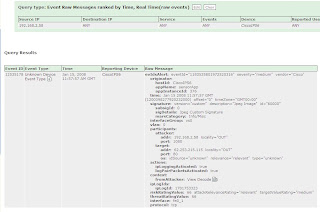
Why is this? Well simply put, MARS does not understand this Event, as its not defined in the MARS database, unlike all the other Cisco IPS signatures.

So how can we tell MARS about our Custom IPS Signatures? We can create an XML file, with the details of the Custom Sigs, and upload it to MARS, see below....

Ok I`ve created a Custom Signature below to fire when a JPG is detected (nothing too exciting i know! ;-p )

Using the Service HTTP Engine, with some simple Regex...
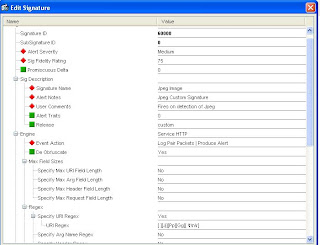
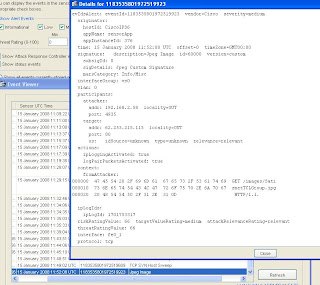
I`ve tested the Custom Signature Works..
And now i`m ready to create an XML file, with its details. I wont go into too much detail, as there is a write up in the User Guide, but the contents on my XML file (for a 5.32 OS) are below, with the important customizable fields in bold.
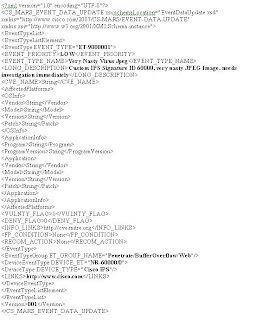
Its important to Note, this XML file should be saved with the format...

x.custom.inc.xml—Where X is an integer . Start with 1 and increment for each additional signature (for example, 1.custom.inc.xml) This number indicates the version number of the custom signature package. Subsequent updates must increment this version number. (Its not documented but i`ve found that this number should match the Version number in the XML)

MARS uses this number to ensure that the Local Controllers are synchronized with the Global Controller.

The Event Type attribute value identifies either an existing MARS event type or a new MARS event type.

If it is a new MARS event type, it should be in the range of 90000000-9049000. This value range is reserved for custom signature IDs.

Note If the ID maps to a previously used custom ID, information for that custom event is updated with the data in this XML file. If ID maps to a system event type, the information is not updated.

The event priority value should match the severity of the firing signature as configured on the Cisco IPS device.

The DEVICE_ET attribute of this element identifies the IPS custom signatureId/subId. For example, if the IPS signature has sigID=60001 and subID=0 then DEVICE_ET=NR-60001/0. The prefix "NR-" is required for all values in this attribute.

The Event Type Group element must be an existing MARS event type group. You can map MARS event types to more than one event type group. ie..

EventTypeGroup ET_GROUP_NAME="Penetrate/BufferOverflow/Web"/
EventTypeGroup ET_GROUP_NAME="Penetrate/All"/

Ok we can now upload this XML file, and MARS will create the new Events..

As you will notice from the above pic, you have to give the MARS box a few seconds after the upload, to apply the changes. (It says version 0 above)

When done, the Custom Signature Update version will display the correct value. This can be confirmed by going to Help/About..


If all goes well, you can see via Management, Event Management, that the new Event is defined..

And we can see the details..
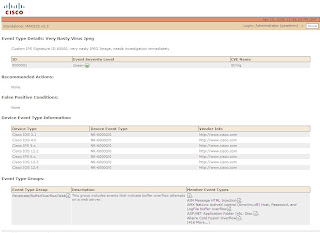
And now MARS will correctly categorize the event when fired by the IPS.

Just one more thing to add that i have found, but its not mentioned in the documentation, so i`m unsure if supported. You can add strings in the XML file for Recommended Actions and False Positve Conditions, and these will be picked up...
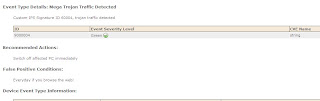

I`ll carry the Custom IPS theme on, in the next article, with how to add more than one Custom Sig at a time, and some troubleshooting.

Tuesday, January 15, 2008

Gen2: Cisco IPS Features - Part 1

One of the things i`m always asked is , what are the differences between then Gen1 and Gen2 appliances, as well as hardware changes?

Well one difference, is the way that the MARS Box can integrate with Cisco IPS.

If you are a Cisco IPS user, you will know, that you can Log IP packets associated with a Signature thats fired.

You can view the trigger packets and IP log data associated with incidents reported by Cisco IDS 4.x and Cisco IPS 5.x and 6.x devices, whether they are sensor appliances or modules.

And quote from the Manual "MARS includes two event types that focus on the these two data types:

•Trigger packet data. Identifies the data that was being transmitted on the network the instant an alarm was detected. You can use this information to help diagnose the nature of an attack. The trigger packet provides a single data packet—the data packet that caused the alarm to fire.

•Packet data. Identifies the data that was being transmitted on the network the instant an alarm was detected. You can use this information to help diagnose the nature of an attack. Although the amount of data contained in an IP log varies based on sensor configuration, by default an IP log contains 30 seconds of packet data. To view this data, you must enable the Pull IP Logs option on the Cisco IPS device under Admin > System Setup > Security and Monitor Devices."

MARS is also able to pull the IP log data from Cisco IDS and IPS devices, and this is where the Gen1 and Gen2 appliances differ.....

Consider the following, on a MARS Gen2 Box, i`ve created a RULE in MARS, to fire, when the ICMP Echo Request signature is hit in Cisco IPS. Not a very exciting example i know!, but it will demonstate the point.

So an Incident is created in MARS..


And this is the Event, on the Cisco IPS Box..

Now this is where the differences lie, in MARS between Gen1 and Gen2 appliances, with the representation of that data in MARS.

A Gen1 box will give the following, with a couple of lines of packet data if your lucky..


And the Gen2 box will give the following..


Notice, how the RAW Message from the Cisco IPS Sensor has all the IDS Alert info, and how there are now 2 extra RAW Message, links available.

The View Decode, will give you a RAW view of the capture, and the Download Decode, will let you download the IP Log in PCAP format to open and view with Ethereal or Wireshark etc..

View Decode


Download Decode


I believe this is possible due to some design changes on the Gen2 boxes, where 500 bytes limit has been increased to 1.5MB.

Cisco Give works of caution with IP Logs "Configuring IP logging and verbose alerts on the sensor is system intensive and does affect the performance of your sensor. In addition, it affects the performance of your MARS Appliance. Because of these effects, you be cautious in configuring signatures to generate IP logs."

In the next part of this series i`ll show you how to update your MARS box (Gen1 or 2) with your Custom IPS Signatures.


Thursday, January 10, 2008

SANS Reading Room Paper


I came across this paper below the other day, that`s worth a read to MARS newbies, in the SANS reading room.

Entitled "Configuring and Tuning Cisco CS-MARS", this paper was produced by John Jarocki, for his GCIA Qualification.

The paper is based on an older version of MARS, so note there have been some improvements like Dynamic IPS Updates since its creation.

On another note, if you have something to share with the MARS community, or would like create a guest article for the Blog please get in touch, or join the Cisco MARS user Group, where we have over 620 users now.


Sunday, January 06, 2008

End-of-Sale and End-of-Life

Happy new year to you all.

Some news that appeared mid Dec 07, if you have not seen this already..

Cisco have announced the end-of-sale and end-of life dates for the Cisco Security Monitoring, Analysis, and Response System (Cisco Security MARS) models 100, 100e, 200, GCm, and GC.

Full info available here.

Ok following the trend of other blogs, my prediction for 2008! I predict Cisco MARS will get some new and very long awaited (overdue!) features :-)

I am going to start my CCIE Security studies this month. If you have had any success with building a lab with QEMU/PEMU, and Dynamips let me know!


Wednesday, December 12, 2007

4.3.2 / 5.3.2 Release

As promised links to the release notes for MARS 4.3.2 for Gen1 and 5.3.2 for Gen2 appliances.

Release Notes for Cisco Security MARS Appliance 4.3.2

Release Notes for Cisco Security MARS Appliance 5.3.2

As mentioned the other day, the major difference between the 2 release codes, is Wireless Controller support in 5.3.2, but not 4.3.2.

"Cisco Secure MARS 5.3. x supports the collection, parsing, and analysis of SNMP security traps generated by Cisco Wireless Controller, version 4.x. devices. In addition, MARS includes this event data in new and existing reports and rules. Support for Cisco Wireless Access Points is enabled via Cisco Wireless LAN Controller, v. 4.1.171.0, which forwards SNMP traps to the MARS Appliance for processing."

Theres also the usual updated Vendor Signatures...

The other new Enhancements are shown below, ripped from the release notes....

•New Activate Button and Activation Scheduler

The Activate button now displays red when a configuration change requires activation. Previously, there was no change in the display of the button. Additionally, a scheduler daemon can be configured from the GUI to automatically execute activations.

•Support for Custom Signature Definitions in Cisco IPS.

Cisco IPS 6.0 enables you to define custom signatures for Cisco IPS devices. In 5.3.2, you can map that signature to a MARS event type so that an inspection rule in MARS fires when that signature is detected. To do so, you must define an XML file that maps between the custom signature and the event type in MARS as well as manually update the Local Controller from the Admin > System Setup > IPS Signature Dynamic Update Settings page.

•Global Controller-to-Local Controller Communication Enhancements.

Enhancements include the following:

–Topology-sync performance improvement

–Report Results performance

–Incidents/Firing Events performance

•Enhanced Cisco Device Support:

–IOS 12.3, 12.4(11) T-T4

–PIX and ASA 7.0.7, 7.2.2, 7.2.3, and 8.0.

–Cisco IPS 6.0 (IDSM/2, IPS 4270, and ASA-IPS SSM 10/20 support)

–FWSM 3.1.4, 3.1.6, and 3.2

•Enhanced 3rd-Party Device Support.

–Juniper IDP 3.x via IDP management server (3.0, 3.1)

–Juniper IDP 4.x via NSM (4.0, 4.1)

–Symantec AntiVirus 10.x (10.1, 10.2)
